Filmora App – The Solution to Easy Video Editing
Filmora App – The Solution to Easy Video Editing. These days, videos are everywhere. When you wake up in the morning, you see a WhatsApp status, scroll through Insta Reels, and the scenery keeps changing, and everyone is vlogging on YouTube. The problem now is that while making videos is easy, editing them has always been difficult. And to be honest, this was always true – you had to either buy expensive software or hire a professional editor.
What is Filmora?
Simply put, Filmora is a video editing app developed by Wondershare. It runs on both PCs and mobile devices. Its main function is to simplify editing. In other words, if you’re a beginner and don’t want to delve into heavy-duty software like Premiere Pro or Final Cut, Filmora is ideal for you. Best editing app for pc. Free editing app
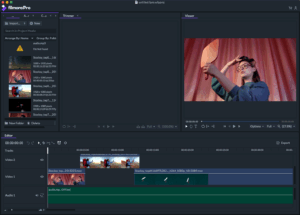
It has all the basic tools you need – cutting, joining, editing audio, applying filters, adding subtitles, and more. The best part is that everything works in a drag-and-drop manner. This means you don’t have to think too hard.
Why do you like Filmora?
Let’s say a new YouTuber needs to add a decent intro, some background music, and occasional transitions. Premiere Pro would take months to learn, whereas with Filmora, you can learn and do all this in 2-3 hours.
Some features I liked:
Ready-made effects – Filters, stickers, and sound effects are already built into the app.
Green screen option – It’s fun to change the background, just like in movies.
Audio clean-up – It fixes unwanted background noise.
Export directly to YouTube – No more searching for the file after exporting, just upload it directly.
Pros and Cons (Honestly)
Pros
Very easy, perfect for beginners.
Available on both mobile and PC.
There’s a good collection of templates and effects.
The price is also lower than other pro software.
Cons
The free version has a large watermark (a bit irritating).
Lags on low-end PCs when running heavy projects.
Professional-level advanced editing isn’t possible.
Who should use it?
YouTubers – especially beginners who need fast and simple editing.
Instagram/Facebook creators – Great for quick editing for Reels and shorts.
Students/Teachers – Easy to create tutorial videos.
Small businesses – Useful for creating ads or promotional videos yourself.
Comparison with other apps
Premiere Pro – Very powerful but takes time to learn. Filmora is more beginner-friendly.
CapCut – Free and popular, but it doesn’t have as many professional templates as Filmora.
Filmora works everywhere.
Personal Take
To be honest, I think Filmora is best for those who don’t want too much hassle. Let’s say you want to post Reels on Instagram or regular vlogs on YouTube. You don’t need thousands of settings or an hour of render time. You just need a video that can be edited quickly and looks good – that’s what Filmora does.
Yes, if you’re planning on making a short film or a larger documentary project, Filmora might fall short. In that case, Premiere Pro or DaVinci Resolve would be better.
Conclusion
So, Filmora is essentially an app that makes video editing easy for everyone. Beginners gain confidence that yes, they too can create professional-looking videos.
If you’re just starting with editing or just want to upload content quickly, Filmora is definitely worth a try.
FAQs
Is Filmora free?
Does it work on mobile?
Do YouTubers use Filmora?
Does it handle 4K videos?
Which is better between CapCut and Filmora?